
sorry, this content is for subscribers only.
Log In
Sign up Today!
Exam Key
Driver Search
How to use it:
The Driver Search function allows you to make use of the most current Medical Examiner library of driver/patient intake entries. This way you don’t have to go through the tedious process of manually entering contact information with every new exam. This also helps to prevent meaningful errors in the ID / Verification section which can impact driver certification:
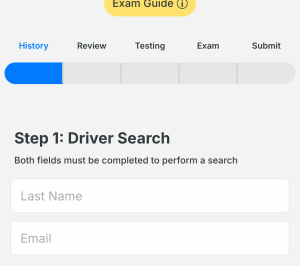
Look up the driver’s entry by filling in the two fields shown:
- Last Name
(important: the last name and email must match the driver’s entry but are not case sensitive)
Thats it! Once completed, the majority of page one will be populated with the driver entry data:
I don’t have any driver entries yet:
Even if you have yet to utilize the driver registration/intake form in your clinic, you can look up the driver’s existing entry by following the instructions above.
My patient has not completed their intake form:
Have the patient scan the following QR Code or URL below to complete their intake:

simplephysical.com/driver
How do I refresh my patient’s data?
Refreshing your patient’s data is as simple as clearing either of the search fields and then re-entering them. It is recommended to clear the Last Name field rather than Email.
All of the fields that have been modified by the driver since their last examination will be updated. This can be helpful in the case of a change of address or new employer contacts.
My patient doesn’t have an email address…
No problem! You can skip the driver search fields and complete the health history form manually if you prefer. Pressing ‘Continue’ will save the exam record to your account.
Simply resume the exam from the dashboard or directory listing. You can now progress through the remaining pages normally and on re-exams.
Driver Clearance Types
Non-Excepted INTERstate (Most Common):
– Cross state lines driving a commercial vehicle.
– Transport cargo that isn’t from your state or is leaving your state.
– Deliver cargo to ports.
– Deliver goods, including logs, to ports.
– Deliver goods across state lines.
– Drive a school bus with passengers crossing state lines to events.
Excepted INTERstate:
– Drive a school bus with students crossing state lines to and from school.
– Occasionally transport personal property without compensation.
– Operate a government vehicle or emergency response vehicle.
– Make emergency deliveries of propane or home heating oil.
– Drive across state lines for city, county, or state-owned and operated transit organizations.
– Haul or deliver mail, supplies, or other goods as an employee of federal, state, or local government.
Non-Excepted INTRAstate:
– Don’t cross state lines while operating a commercial vehicle.
– Transport cargo that originated in and stays in my state.
– Drive a school bus that only transports passengers within my state.
– Drive trucks that only transport and deliver goods to and from addresses in my state.
Excepted INTRAstate:
– Do not operate a commercial motor vehicle.
What if they don’t know what type of commercial driving they’ll be doing?
The most flexible option is to certify as a Non-Excepted INTERstate driver and submit a medical certificate. This allows them to accept jobs that require you to operate across state lines.
The driver is not a CLP/CDL applicant/holder?
Choose ‘none’ from the drop down options.
Foreign Address (Non-US/CAN)
- The company they work for (if they are employed by a U.S. carrier).
- A friend or family member (if the driver has a contact in the U.S. or Canada).
- A mailing address service: Many services provide mail forwarding and offer a U.S. or Canadian address for drivers to receive correspondence.
The key here is that the address is just used for registration purposes and doesn’t need to be their permanent address or business address.
Note: Ensure that the address used is valid and that the driver has access to any correspondence or notifications that may be sent to this address, such as updates on the medical certification process.